Platform-specific issues
Others can see the software after screen sharing
This is usually caused by a system version that is too low or by not completing setup according to the docs. First confirm the system version and platform settings, then complete configuration by following the Stealth Mode page.
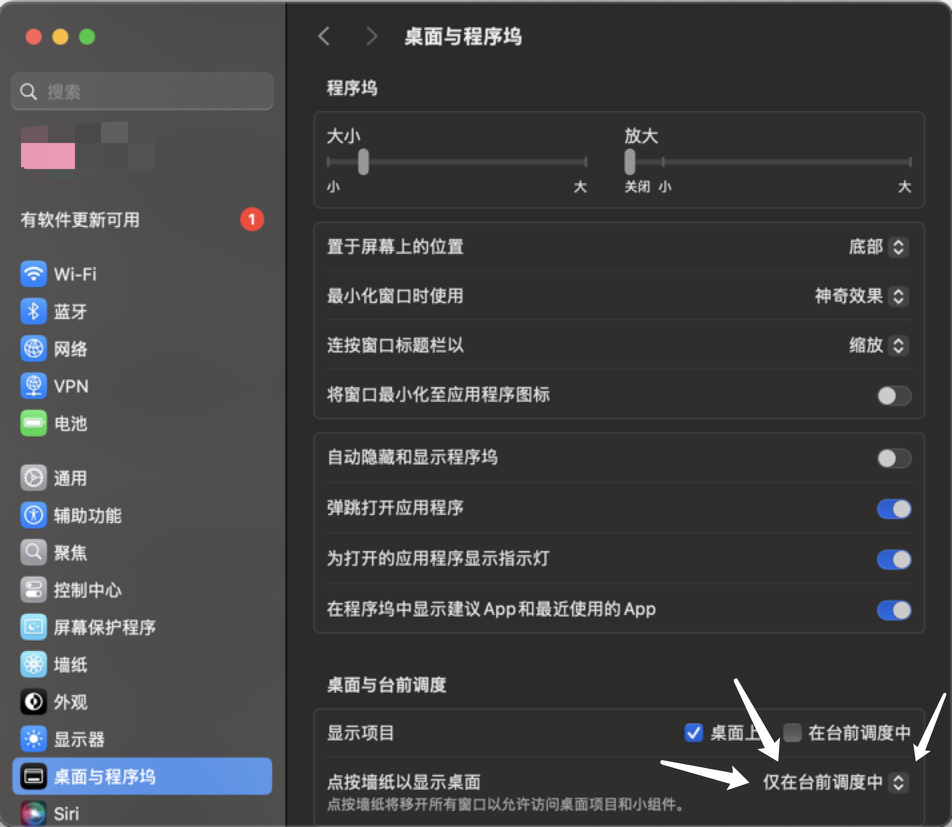
macOS: clicking wallpaper to show desktop hides the software
Open "Desktop & Dock" and change "Click wallpaper to show desktop" to "Only in Stage Manager."
macOS: menu bar prompt cannot be closed
This is a macOS system security mechanism. It cannot be closed and can be ignored.
Tencent Meeting / Zoom stealth settings
- Tencent Meeting: choose "prioritize fluency" when sharing the screen.
- Zoom: enable "Advanced capture with window filtering."
Detailed settings: Stealth mode.
- Consider using an alternative platform.
Screen recording
Problem: the call is recorded.
Solution:
- Verify that stealth mode works during recording.
- Be extra careful with window positioning.
- Consider refusing recorded sessions.
- Practice natural behavior patterns.
General platform solutions
Testing a new platform
Steps to test any new platform:
- Join a test call with a friend.
- Share the screen and open GankInterview for the interview.
- Verify application stealth.
- Test all shortcuts and features.
- Record any issues or required settings.
Emergency procedure
If detected on any platform:
- Stay calm and do not admit anything.
- Use
Cmd + Bto quickly hide the application. - Explain it as a system notification or update.
- Continue the interview professionally.
- Avoid using the application during the rest of the session.
Backup strategy
For any platform:
- Always prepare to solve problems manually.
- Regularly practice without AI assistance.
- Know how to disable the application quickly.
- Prepare an explanation for any suspicious activity.
- Keep support contact information easy to access.